- DataMigration.AI
- Posts
- The Real Cloud Migration Cost Nobody Warns You About
The Real Cloud Migration Cost Nobody Warns You About
Make Sure Your Organization Isn’t Next


Shen Pandi & Damian - Data Migration Expert
March 05, 2026
What’s in it?
Hidden Fees Can Inflate Cloud Budgets by 30%
Why Lift-and-Shift Can Drain Your Cloud Budget
Rightsizing Servers Can Cut Cloud Costs 20–40%
The Legacy App Cost Nobody Puts in the Board Presentation.
Now, let's be brutally honest with you. Are you aware that if you have been given a ballpark figure for the cost of cloud migration, it's probably not as clean and neat as it sounds? Let's face it: Cloud migration is not an event. Cloud migration is an investment with many layers.
Many moving parts involve not just people but infrastructure, data, and the long-term strategy of the organization. Go ahead. Ask your CFO how much was spent on the last migration project. I'll tell you right now that the amount spent was probably 30-40% more than what was originally proposed in the boardroom.
To understand the common missteps, I spoke with the professional services team at Pure Storage. What I learned reveals that the path to success isn't about working harder, but about working smarter, often by admitting you need expert help.

The reason for this is not that people are incompetent. The reason for this is that people simply do not understand the cost of cloud migration. And that's where this guide comes in. In the year 2026, with global cloud spending now over $700 billion annually, it's time for your organization not to make the same mistake.
Worried your migration budget is hiding a time bomb? Get a free cost-exposure checklist that CFOs wish they had.

The One Number Everyone Asks For (And Why It's the Wrong Question)
The question that executives ask most commonly is how much it would cost to migrate to the cloud.

The right question to ask instead would be what exactly is my scope of migration, and what would be the cost of each phase in due course.
However, you need to have a frame to begin with. For instance, if you are a small business with mostly modern applications and little legacy baggage to deal with, you would need to invest between $40,000 and $100,000 in migration to the cloud. The cost of operation in the cloud would be between $10,000 and $30,000 each year.
If you are a mid-sized business with some legacy applications and some modern applications to deal with, you would need to invest between $100,000 and $300,000 in one-time migration to the cloud, and between $40,000 and $100,000 each year in operation costs.
If you are a big business with regulated applications to deal with, global operations to handle, and enterprise resource planning applications that have been around for over a decade in legacy form, you would need to invest over $600,000 in one-time migration to the cloud and between $100,000 and $200,000 each year in operation costs.
These figures would make much more sense if you knew exactly what you were getting into. So let’s take a look at what exactly you would be getting into.
The Costs Most Budgets Miss Entirely
Before you even start putting a single byte into the cloud, you're already spending money on prep work. Think of it as laying the foundation for the migration. If you skip it, you're essentially doubling your costs on something you should have done in the first place.
Your readiness assessment is essentially designing every single app, every single dependency, and every single data flow that an organization currently has. This is not an option; it’s a must-have, and it’s arguably the single most critical component to keeping costs under control moving forward.
If organizations don’t get this part right, they're essentially inviting costly surprises mid-migration. So, invest around $5,000 to $30,000 on a thorough discovery and architecture plan, and every single dollar spent here is essentially insurance.

Then there's tooling. Migration tools, monitoring tools, security tools, and license upgrades can add up faster than many organizations anticipate. Many organizations assume that licenses are automatically transferred to the cloud.
They're not. One single mistake on a single license can ruin an otherwise well-thought-out migration plan. So, invest around $10,000 to $50,000 on tools and licenses alone.
Lastly, there's data transfer. Transferring data between regions, especially if HIPAA or GDPR comes into play, is not cheap or fast. Depending on the cloud provider, egress fees can turn a modest storage budget into a six-figure mistake. Consider not only how much data you're moving but also its origins and destinations.
The Ongoing Costs That Never Stop Surprising Finance Teams
Once your workloads are deployed in the cloud, a new set of expenses begins. The main expenses for the month include the cost of computing, storage, and network. However, if you didn’t right-size your workloads before the migration, you will end up spending money on resources that are not required.
Compute expenses include the cost of virtual machines, containers, or serverless for powering your applications. Additionally, storage expenses include hot storage for data that requires frequent access (most expensive), cold storage for data that requires less frequent access, and cold storage for data that requires the least access.
Networking can catch you off guard with the cost of cross-region data transfer and data egress. These expenses are famously difficult to predict.

In addition to the above expenses, operational tools include the cost of observability tools, logging tools, backup tools, and security tools. These are not add-ons; these are the tools that keep your cloud infrastructure healthy. The cost of operational tools can range from $10,000 to $50,000, depending on the complexity of the tools.
Why Your People Might Be Your Biggest Budget Line
Cloud is not just a new platform. Cloud is a new philosophy on how we run infrastructure. Those teams that used to worry about keeping on-prem servers up and running must now understand automation pipelines, cloud security models, and DevOps practices. This training is not optional, and it is certainly not cheap.

Whether it's internal training programs, external training programs, or just recognizing the opportunity cost of having developers spend weeks on training and education, it can be expensive. Training and upskilling programs can cost six figures in large enterprises. And while the costs of not doing it properly, misconfigurations, security holes, and out-of-control cloud costs are almost always higher.
The Application Refactoring Problem Nobody Wants to Discuss
The truth that doesn’t always come up early enough in a migration process is that a lot of existing applications were simply never designed with the cloud in mind. They were designed with fixed servers in mind, with predictable capacity. If you try to lift and shift them over to the cloud without doing any additional work, you’re essentially throwing money out the window.

The highest cost in a corporate migration process is refactoring or re-architecting legacy applications to take advantage of native cloud features like containers, microservices, or serverless functions. It’s also the most misunderstood cost in the process.
If you’re planning to lift and shift applications but your core ERP application needs to be fully rewritten, you’re in for some serious pain in the middle of your project, and it can lead to some of the worst cost overruns in the business.
The Budget Items That Can't Be Negotiated Away
If you handle patient data, financial data, or any type of personally identifiable data, moving to the cloud doesn’t eliminate, it increases, the number of compliance activities you must perform.
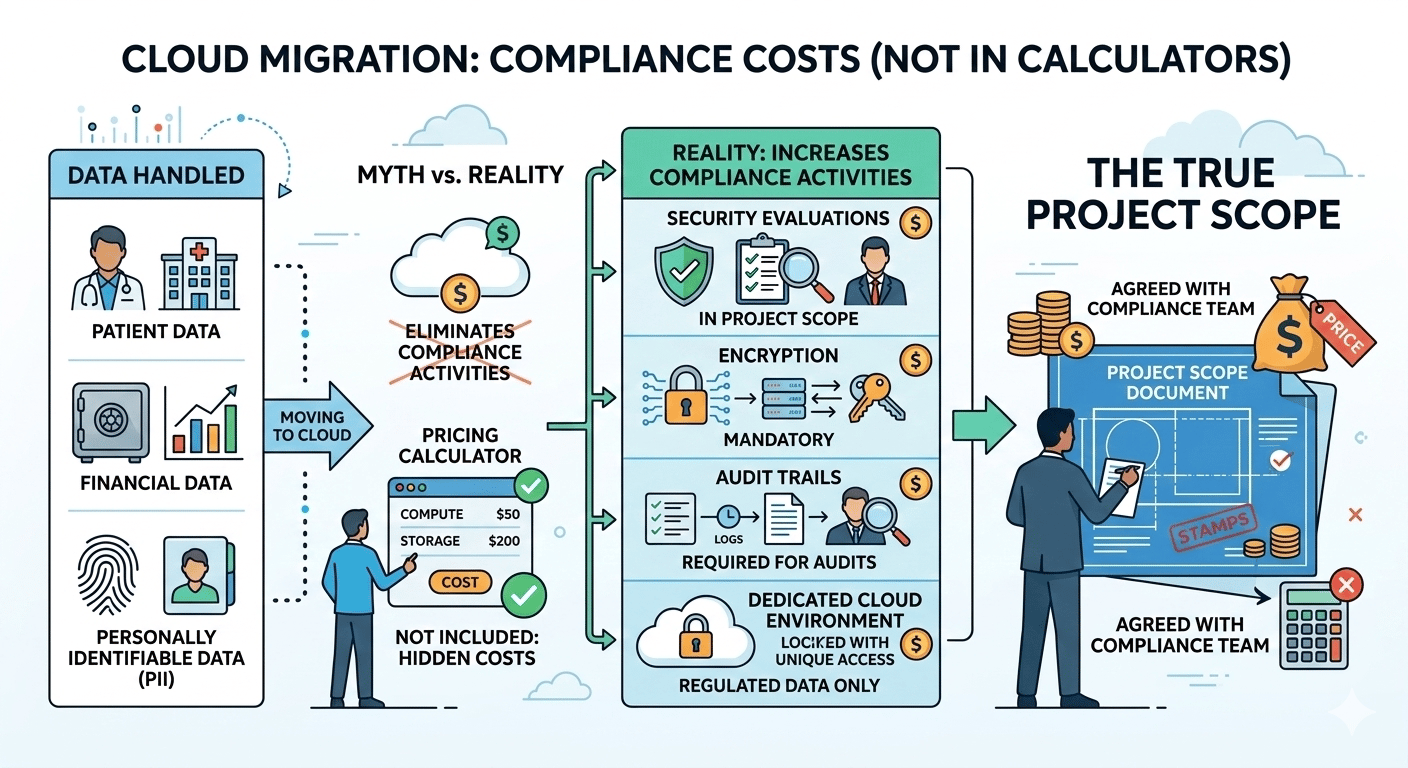
Security evaluations, encryption, audit trails, and, in some cases, a cloud environment dedicated to regulated data are all required costs that aren’t included in a pricing calculator provided by a cloud service provider, but are included in the project scope document agreed upon with your compliance team before the project’s start.
In almost any move towards the cloud, there are always one or two workloads that didn’t make the trip. They might be something like a manufacturing system closely associated with production equipment, or a payroll system that has many on-premises dependencies. These systems, however, still need to talk to your new cloud-based apps, and every one of those connections is another software development project.

Building robust, secure bridges between your new cloud-based system and the on-premises system can be challenging work, requiring experienced developers and sometimes middleware tools. When you multiply this by the dozens of apps that might be part of your average enterprise IT system, the total cost of integrating those apps can run upwards of $50,000 to $150,000, depending on the complexity of the migration.
The 7 Migration Strategies and What Each One Will Cost You
Your migration costs vary based on how you plan to move each app. There is no one-size-fits-all answer. Most companies use a combination of these strategies based on business value and complexity for each app.

The Rehost (Lift and Shift) approach is the easiest migration method. You’re taking your existing virtual machines and just moving them to the cloud without making any changes. It’s a quick process that’s less expensive (estimated to be between $40,000 and $100,000 for small projects). It’s a good option if you want to leave your data center quickly. However, you’re not realizing the full benefits of using the cloud for increased efficiencies. You’re just moving your existing inefficiencies to a new location.
The Replatform (Lift and Reshape) approach is a step up from Rehost. You’re moving your applications but making a few changes, like replacing a database in your datacenter with a cloud-based solution. It costs a little more (estimated to be between $100,000 and $200,000, depending on how many applications you’re migrating).
The refactoring and re-architecting paths are the bold and adventurous ones. This means thinking about applications from a greenfield perspective as cloud-native applications that are broken down into microservices, containerized, and optimized for dynamic scaling. Large enterprise refactoring efforts can far exceed the range of $200k to $400k. However, this is what it takes to achieve cloud innovation at its best and gain scalability and agility that can create a competitive advantage.
Repurchase (Drop and Shop) means replacing your current applications with a SaaS alternative. Workday replaces your current HR system. Salesforce replaces your current CRM system. However, you'll pay a lower price for migration, which is usually less than $100,000. You'll pay subscription costs for applications every year.
Retire is the most cost-effective option. Zero in on applications that don't provide business value and kill them. Most companies find that when a proper audit is done, 10% to 20% of their entire IT portfolio qualifies for retirement. Every application you retire means you have fewer applications to migrate.
Retain is for companies that understand that not all applications are meant for the cloud. Some applications are latency-sensitive, have regulatory issues, or are tied to hardware. Identifying these applications means you'll save migration dollars on applications that won't give you a good ROI in the cloud.
In reality, a migration project is a mix of all these strategies. You might rehost half of your applications to meet a migration deadline. You might refactor a mission-critical customer-facing application. You might repurchase your current HR system with a SaaS alternative. And you might retire 15% of your applications that nobody has touched in five years.
Five Smart Moves That Will Keep Your Cloud Migration Costs Under Control
Rightsize Before You Migrate, Not After
One of the most common mistakes is the “lift and shift” of oversized infrastructure. “If your on-premises servers are at only 30% Utilization on average, then moving them as-is to the cloud means that you are now spending money on idle capacity.”

Before moving anything to the cloud, it’s worth investigating how the workloads really use the resources and scaling the resources appropriately in the cloud. This can save you 20-40% on the monthly cost.
Phase the Migration, Resist the Big Bang
The temptation to move everything in one shot is great, especially when management is pressuring you to "leave the data center behind." Don’t give in to this temptation. By doing a phased migration, you can learn from each wave, discover hidden dependencies before they blow up on you, and spread out the cost so that your finance people can actually plan for it.

Start with low-risk, non-critical applications, prove that your architecture works, and then move on to mission-critical systems.
Use Managed Services Instead of Rebuilding Everything
Cloud providers have pre-configured services for all the above. In fact, for ML pipelines, too, we have pre-configured services. By using these services, we can reduce the operational load by half.

Although using these services indeed involves an extra cost of the subscription, the operational hours saved are definitely worth the extra cost.
Negotiate With Cloud Providers Before You Sign Anything
Cloud providers' prices aren't on a menu. Enterprise cloud deals can be negotiated, and providers will bid for large commitments. Reserved instances, where you prepay for a certain level of resources for one to three years, can reduce costs by 30-60 percent over on-demand pricing.

Leverage the side-by-side comparison of multiple providers. The best deals are often before you commit, not after.
Optimize Continuously After Go-Live
The most expensive mistake after moving to the cloud involves assuming that everything has been completed. If you fail to optimize your environment, right-size instances, stop unused instances, check reserved instance adoption, and optimize auto-scaling groups, you may see your cloud bills rise over time without your knowledge or attention.

If you do not optimize after moving to the cloud, you may be spending 20 to 30 percent more than you should be spending on your workload.
Why Cloud Migration Is an Investment, Not Just an Expense
The CFO looking at a $400,000 budget for cloud migration and saying, “What do we actually get for this?” is hitting on exactly the right question. And the answer is that the reward is not just cheaper servers; it's a reward in three dimensions that goes far beyond just reducing your hardware costs.

The first dimension is that you break free from the capital cycle of hardware and infrastructure. You don't have to worry about hardware refreshes every three years. You don't have to worry about making emergency purchases when a server crashes. You can just have a steady stream of costs as an operational expense. And that's valuable.
The second dimension is that you can move at a speed that is much faster than your competitors. In a world where you can deploy a solution in a cloud native environment in a few days that would have taken you three months to deploy in a traditional environment, for a sector where speed-to-market is a key differentiator, retail, fintech, and digital health, speed is much more valuable than any hardware discount.
The third dimension is that you can actually deploy advanced capabilities that you couldn't otherwise afford. Machine learning, analytics, IoT integration, and content delivery networks are all advanced capabilities that can actually drive much higher returns for an organization that understands that cloud migration is not just about modernizing hardware but is actually a platform for innovation.
See your real migration bill before you sign anything - book a live demo and stop surprises. →

The Question Isn't Whether You Can Afford to Migrate, It's Whether You Can Afford to Wait
Your competition isn’t waiting. The leaders, across industries, are the ones who traded their outdated infrastructure for cloud technology - technology that moves faster, scales smarter, and can innovate at speeds equal to, or even greater than, what on-premise solutions can provide.
Yes, there are costs associated with migrating to the cloud, and they can be significant. They can be substantial, especially if you don’t plan correctly, which can cause those costs to far exceed what you might initially be budgeting for.
But if you plan correctly, budgeting for the full scope of what migration might entail, you can realize benefits far beyond what you might initially be saving on infrastructure.
If you view cloud migration as a strategic business initiative, rather than simply an IT project, you can realize benefits far beyond what you might initially invest. View it as a checkbox, however, and the costs can far exceed what you might initially budget for.
You now have the full picture, so go ahead - use it!
Thank you for reading
DataMigration.AI & Team